Embeddable SDK · React, Angular, or neither

Stop building a report template for every customer.

BroadPaper is an embeddable visual report designer for web applications. Your users lay out their own branded documents against the data fields you declare; your product keeps ownership of the data, the rendering and the release schedule.

React and Angular wrappers over one framework-free mount API · vector PDF in the browser or on your server · no telemetry, no hosted component

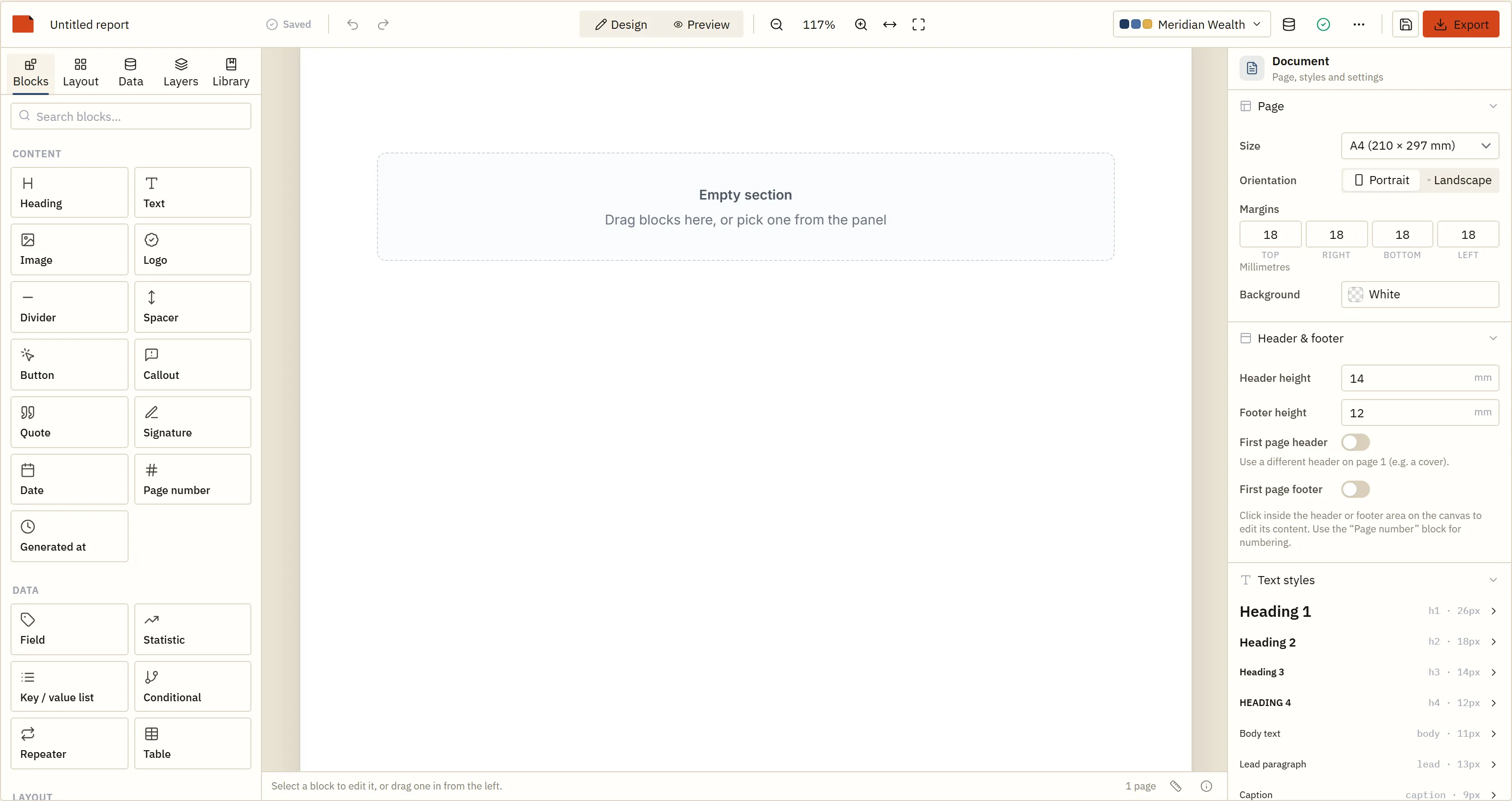
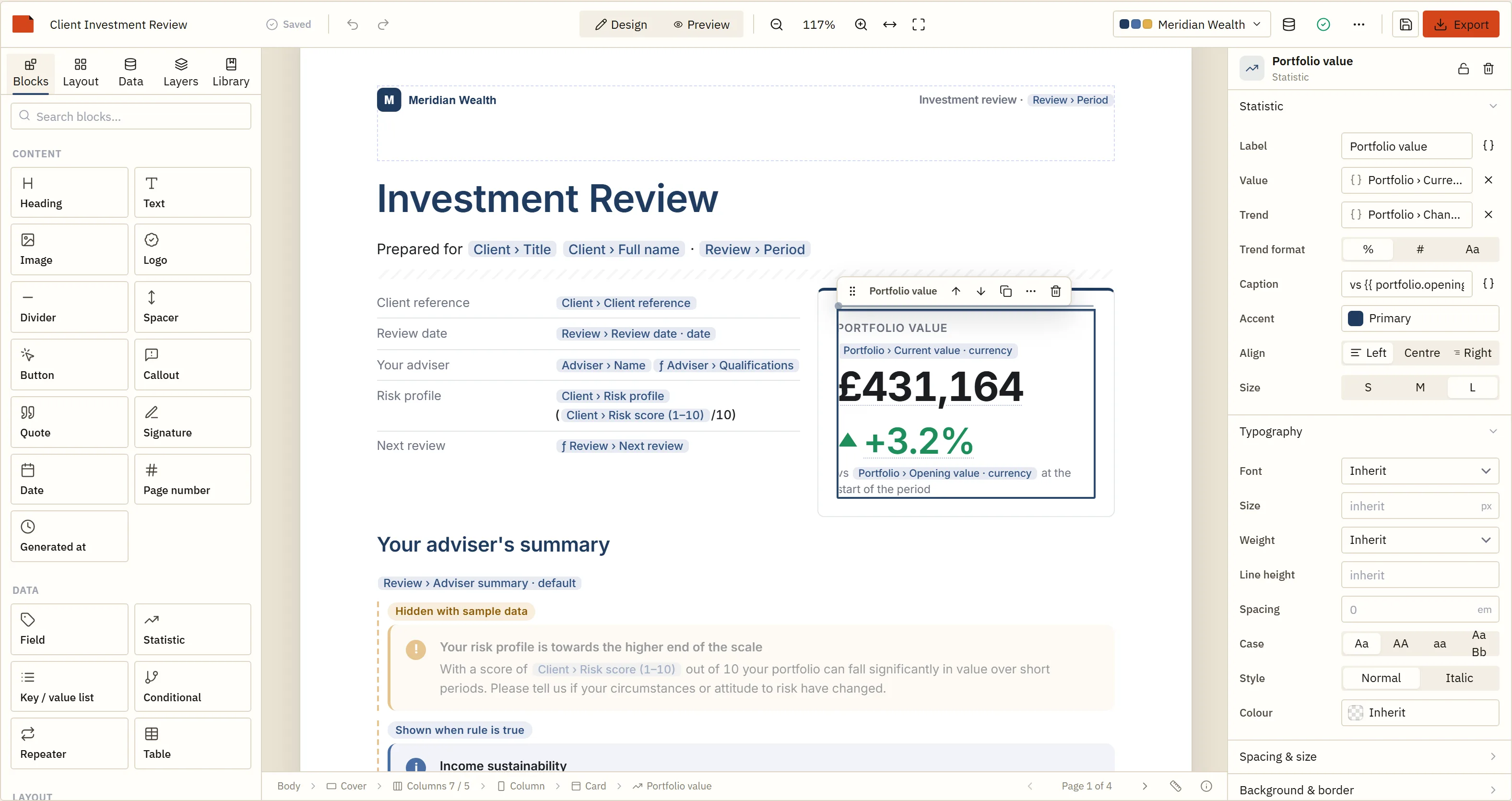
This is the component, running in this page. It is the same build a customer of yours would see.
§ 01How it happens

Nobody decides to become a document-layout department.

It starts well. One document, written in code, by the person who owns the data. It works, it ships, it is fine for a year.

Then a customer asks for their logo in the other corner. Another wants an extra column. A third wants the summary before the table rather than after it, and the fourth has a legal department with opinions about a footer. Each one is twenty minutes. Each one is also a branch, a review, a release and a regression test on a document you cannot easily test.

A year later there is a folder of near-identical templates with customer names in them, a conditional that nobody can safely delete, and a standing item in every sprint called “report changes”. The layout has quietly become application state, and it is the only state in your product you cannot change without a deployment.
  • “Can we move this section?”
  • “Can our logo go here?”
  • “Can we add another table?”
  • “Can each of our clients have their own version?”
  • “Can this page only appear when there's something on it?”
  • “Can we do it ourselves?”
§ 02Three architectures

Generate it, template it, or hand over the layout.

These are three different answers to “who is allowed to change this document”, and most teams try them in this order. Knowing which one you actually need is worth more than any feature comparison.

A

Generate programmatically

jsPDF, react-pdf, pdfmake, HTML and Puppeteer. The document is source code: components, coordinates or a definition object, compiled and deployed with everything else.

Changing it means
A pull request.
Good when
Engineering owns every document and they rarely move.
Falls over when
The number of variants passes about five, or somebody outside the team needs a change this week.

B

Template it

Handlebars, Liquid or a hand-rolled HTML template per customer, stored in the database and filled at render time. Technically data, practically still code.

Changing it means
Someone technical editing markup, carefully.
Good when
Variants are small — a header, a strapline, a colour.
Falls over when
The change is structural. Nobody without your stack can make one, nothing validates it, and a broken template is found by a customer.

C

Embed a designer

The layout becomes a document your users edit visually, bound to fields you declared. It is stored as JSON, validated on the way in, and rendered by an engine that owns pagination.

Changing it means
A customer drags something and presses Save.
Good when
Layout requests are reaching your backlog with other people's names on them.
Falls over when
There is one document and it never changes. Then this is a dependency you did not need.

The three are not exclusive and most products end up with two of them. A statutory document whose layout is prescribed by law belongs in code, where a reviewer can see it change; the fifteen customer-facing documents beside it do not.

§ 03What “embedded” has to mean

Handing over the layout is easy. Handing it over safely is the product.

A designer your customers can reach is a surface on your application. Five things have to be true before that is a good idea, and they are the five things that took the longest to build.

They can only see what you declared

The designer's palette is your schema — typed fields with the labels you gave them. There is no query builder, no table names, no joins and no way to address anything you did not describe. A template references fields by path and is inert until your code hands it data.

No code executes, ever

Users can write expressions; those expressions are parsed by a hand-written tokeniser and Pratt parser and evaluated by a tree-walking interpreter. No eval, no Function, no compilation to JavaScript. Property access reads own data properties only, so __proto__ and constructor resolve to nothing.

No HTML in, no HTML out

Rich text is a structured model — paragraphs, marks, tokens — never markup. Rendering builds DOM from that model with text nodes and attribute setters; pasting accepts plain text. A customer cannot smuggle a <script> into a document another customer opens.

You can refuse a template

validateTemplate answers, without any data at all, whether every binding still matches your schema — so a design saved against last quarter's fields is a 422 at your API rather than a blank space on somebody's invoice. migrateTemplate brings older saves forward on load.

Nothing leaves your infrastructure

No SaaS component, no vendor telemetry, no licence check that phones home. Licences are signed certificates verified offline. The SDK makes no network request of its own; the ones you can configure are a font URL, an asset URL and your own render service, and the security guide lists all three.

And you decide how much designer they get

Feature flags narrow the editor to the audience. An operations manager does not need the expression editor, the raw JSON or page-margin controls; a power user at an enterprise customer might want all three. Same component, different flags.

The security guide → Validation →

§ 04White label and multi-tenancy

Your product, their brand, our absence.

Once it is licensed there is nothing of BroadPaper in the documents your customers send, and nothing of BroadPaper on screen unless you want it there. The editor takes your appearance; the documents take the tenant's.

TenantDesigner.tsx React
// The same designer, narrowed for an audience who did not ask to meet a
// document object model. Everything here is a flag, not a build.
<ReportDesigner
  dataSources={dataSources}          // the only fields that exist, as far as they know
  theme={tenant.theme}               // their colours, their fonts, their logo
  themes={[tenant.theme]}            // one brand in the switcher: theirs
  features={{
    whiteLabel: true,                // no BroadPaper mark in the toolbar
    expressions: false,              // no free-form expression editor
    jsonView: false,                 // no raw template
    pageSettings: false,             // page size and margins are yours to decide
    customBlocks: true               // but your own blocks stay in the palette
  }}
  appearance="system"
  onSave={(template) => api.saveTemplate(tenant.id, template)}
/>

The Angular component takes the same options as inputs. Both wrap one framework-free createReportDesigner(element, options), which is also what you would call from Vue, Svelte or nothing at all.

The designer opened on an empty document, with the host application's data schemas already listed in the left-hand panel ready to drag on
Fig. 1An empty document with your schemas already on the left — which is where a customer designing their first report starts.

Multi-tenancy, in practice

  • One template per tenant per document, as a row. Copy from a default set when a tenant is created.
  • One design, many brands. A template that names theme tokens re-brands with one option, so a shared design still looks like theirs.
  • History is yours. Templates are JSON, so revisions, diffs, “restore” and “copy to sandbox” are things you already know how to build.
  • Nothing cross-tenant. A template is inert data; it renders only against the data your code passes in.

Is this for you?

A good fit

  • Multi-tenant SaaS where customers send documents to their own clients
  • Financial services, compliance, inspection and audit platforms, CRM and ERP, practice management
  • Products with a “reports” area that has grown faster than the team maintaining it
  • Anywhere an enterprise deal has ever depended on a layout concession
  • Teams who need the rendering to stay inside their own infrastructure

Probably overkill

  • A single invoice, receipt or confirmation that nobody has asked to change
  • Internal documents whose only readers are the team that owns the code
  • Products where print CSS already produces something people are happy with
  • Anywhere the honest answer is that customers want the data, not the document — a CSV export is cheaper and better

If you are not already maintaining layouts on other people's behalf, an embedded designer is a dependency you do not need yet. Come back when the third customer asks.

Questions

What is an embedded report designer?
A visual document editor that runs inside your own application rather than as a separate reporting tool. The host application declares which data fields exist; the application's users lay out the document; the SDK owns measurement, pagination, branding and output. The saved result is data you store — in BroadPaper's case a JSON template — so you can version it, copy it between tenants and validate it on the way in.
How is it different from generating reports programmatically?
Programmatic generation puts the layout in your source code, which means every change is a code change, a review, a release. An embedded designer moves the layout into your database, where a customer can change it without you. Both are legitimate; the question is who needs to be able to change a document, and how often.
Can customers create their own report templates?
Yes, and they can only reach the fields you declared. There is no query builder, no table names and no way to address anything you did not describe. A saved template references your fields by path, so it is inert on its own — it produces a document only when your code hands it data.
Can each SaaS customer have a different report template?
Yes. A template is a row. Most products end up with one template per tenant per document type, plus a set of defaults they copy from when a tenant is created. Branding is separate again: a template built on theme tokens re-brands with one option, so a hundred tenants can share one design and each still get theirs.
Is it white-label?
Yes. features: { whiteLabel: true } removes the BroadPaper mark from the toolbar, the editor takes your own accent colour and appearance, and the documents it produces carry nothing of ours once the SDK is licensed. Nothing in the product phones home or announces itself to your users.
Where does the PDF get rendered?
Wherever you want. The engine is WebAssembly, so it runs in the user's browser, in a Node worker, or behind @broadpaper/server as a container with a queue and a bearer token — and a .NET client calls that service when the back end is C#. The page breaks are decided before any of them draws a page, so the choice is about deployment rather than fidelity.
Does our data go anywhere?
No. There is no SaaS component, no telemetry and no licence check that phones home; licences are signed certificates verified offline. The SDK makes no network request you did not configure, and the ones you can configure — a font URL, an image URL, your own render service — are listed in the security guide.

Put it in front of one customer and see.

Everything works without a licence — every block, both PDF backends, unlimited documents. The only difference is an evaluation mark on the output, and there is no trial clock.