Recurring client reports
A report for every client, from the spreadsheet you already keep.
If you send the same report to a list of clients every month or every quarter, and build each one by copying the last, this is the job BroadPaper Cloud takes off you. You design the report once. After that, a month's reports are the new spreadsheet and a button.
The first month
- Bring in the spreadsheet. An Excel file, a CSV or JSON, rows pasted from a spreadsheet, or a file chosen straight from Google Drive or OneDrive. One row per line of the report — a holding, a project, a workstream — with the client's name on each row.
- Choose the client report template, or another from the gallery, or start from a Word document or PDF you already send (Pro).
- Add your letterhead — name, address, registration details, logo and colour — once, for every design.
- Look at what BroadPaper matched, answer anything it asks, and change whatever you like about the design.
- Say yes to one report per client, check a couple on screen, and make them.
Every month after
- Bring in the new spreadsheet and point the design at it — or, if it lives in Google Drive or OneDrive, open the data and press Refresh.
- Check a report or two. The design still knows which column is which.
- Make the documents.
Keep the spreadsheet's headings the same from month to month and there is nothing to answer. If a column the design uses has gone, or now holds something different, BroadPaper says so before anything is made.
What BroadPaper decides, and what it asks.
- What each column is
- From the heading and the values under it together. “Customer Name”, “Client” and “Account” are the client; a column of percentages beside the holdings is their share. You never type a field code or draw a line between two boxes.
- What kind of value it holds
- Decided by a vote across the whole column rather than cell by cell, so
03/04/2026is the same month on every row and a reference number keeps its leading zeros. - The total
- Added up from the lines when that is what it is, or read from a column when your spreadsheet already has it.
- When it asks
- When two or three columns could each be the figure — a portfolio total, a current value, an asset figure — it will not pick one and hope. It shows you each with your own numbers beside it and asks once. The answer is remembered.
- Changing its mind
- Every match can be changed, or thrown away to start again. A saved choice that no longer fits next month's data is shown with a warning beside it, not carried over without a word.
One spreadsheet, a report per client.
A file with every client's holdings in it would otherwise make one report with the first client's name above everybody's lines. BroadPaper notices that a column holds several clients and asks whether this is one document or several. Split it, and making the documents offers three things:
Pro makes 500 documents a month and holds 50,000 rows in one set of data; the free plan makes 10. One file holds up to 250 pages, and anything longer comes out as numbered parts.
What goes in it is up to you.
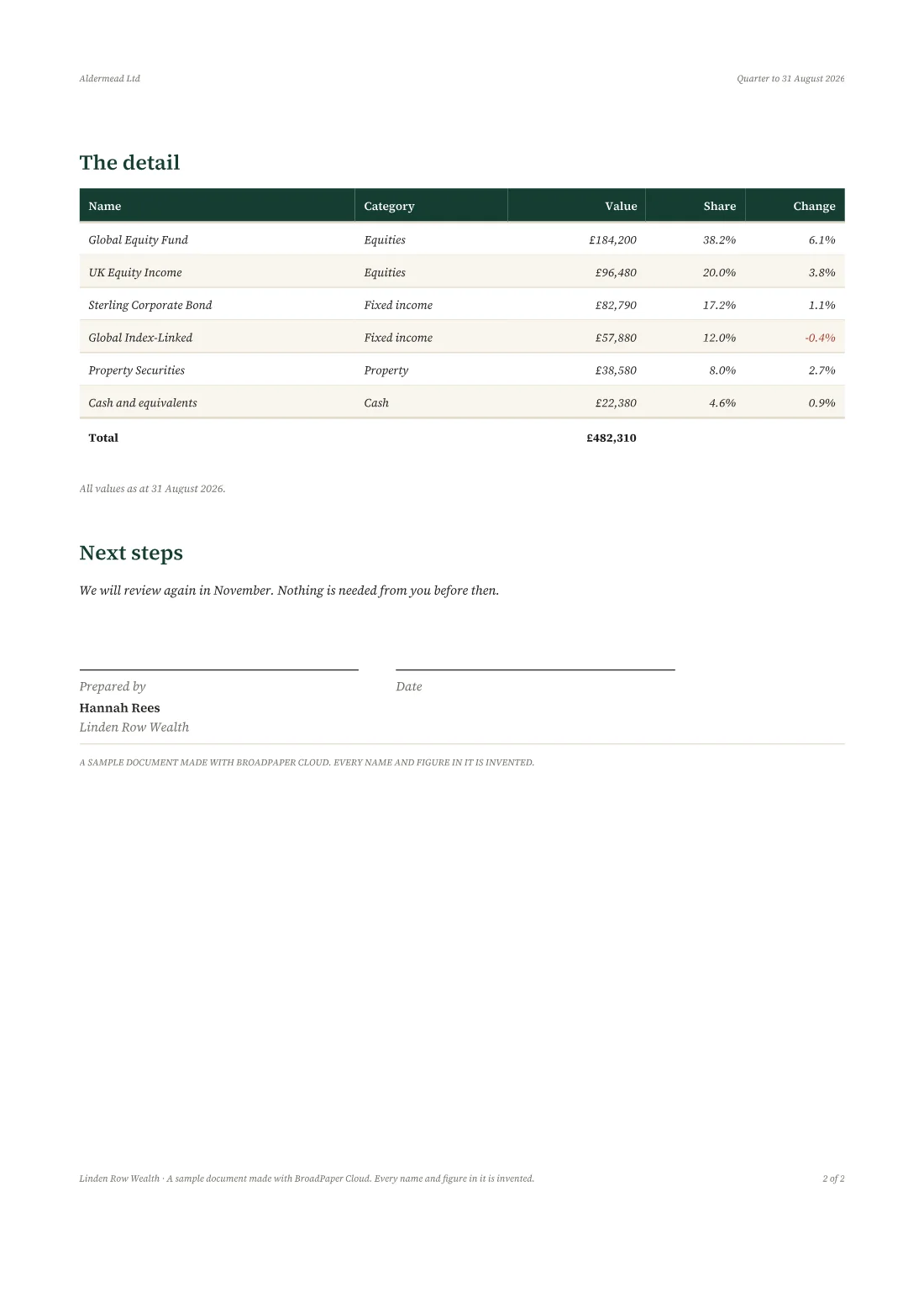
The client report template has a branded cover, the headline figure and how it moved, charts of how it is made up, the detail on a page of its own, your commentary, next steps and a signature block. Every part can be changed, moved or removed.
- Client reportA branded review: performance, holdings, commentary. Runs to several pages.
- Monthly reportHeadline figures, a trend chart and a table of the detail behind them.
- Market commentaryA branded market note for clients: what moved, a chart of it, and what it means. Runs to several pages.
- StatementOpening balance, every movement in the period, closing balance.
Commentary can come from a column in the spreadsheet, so each client's report says something written for them — or be typed into the design once, for everyone.
What it doesn't do.
Better to know now than to find out after paying.
- It doesn't run on a schedule. You make the month's reports when the figures are ready, by pressing the button.
- It doesn't email your clients. You send the files, or a share link from BroadPaper with an expiry or a password if you want one.
- It doesn't connect to your CRM, portfolio system or accounting software. The data comes from a spreadsheet, a CSV or JSON file, Google Drive or OneDrive. If your system can export one of those, that is the route in.
- It doesn't write the commentary. It prints what you or your spreadsheet say. Nothing is generated.
Try it on last month's spreadsheet.
The free plan is the whole product with your own data. Pro is $59 a month or $590 a year, billed in US dollars.