React · Embeddable report designer

React report designer

Embed a visual report designer directly in your React application. You declare the data your users may bind to; they lay out the document; BroadPaper owns layout, branding, pagination and a print-perfect PDF — so a layout change stops being a development ticket.

pnpm add @broadpaper/core @broadpaper/blocks @broadpaper/renderer @broadpaper/editor @broadpaper/react @broadpaper/forme

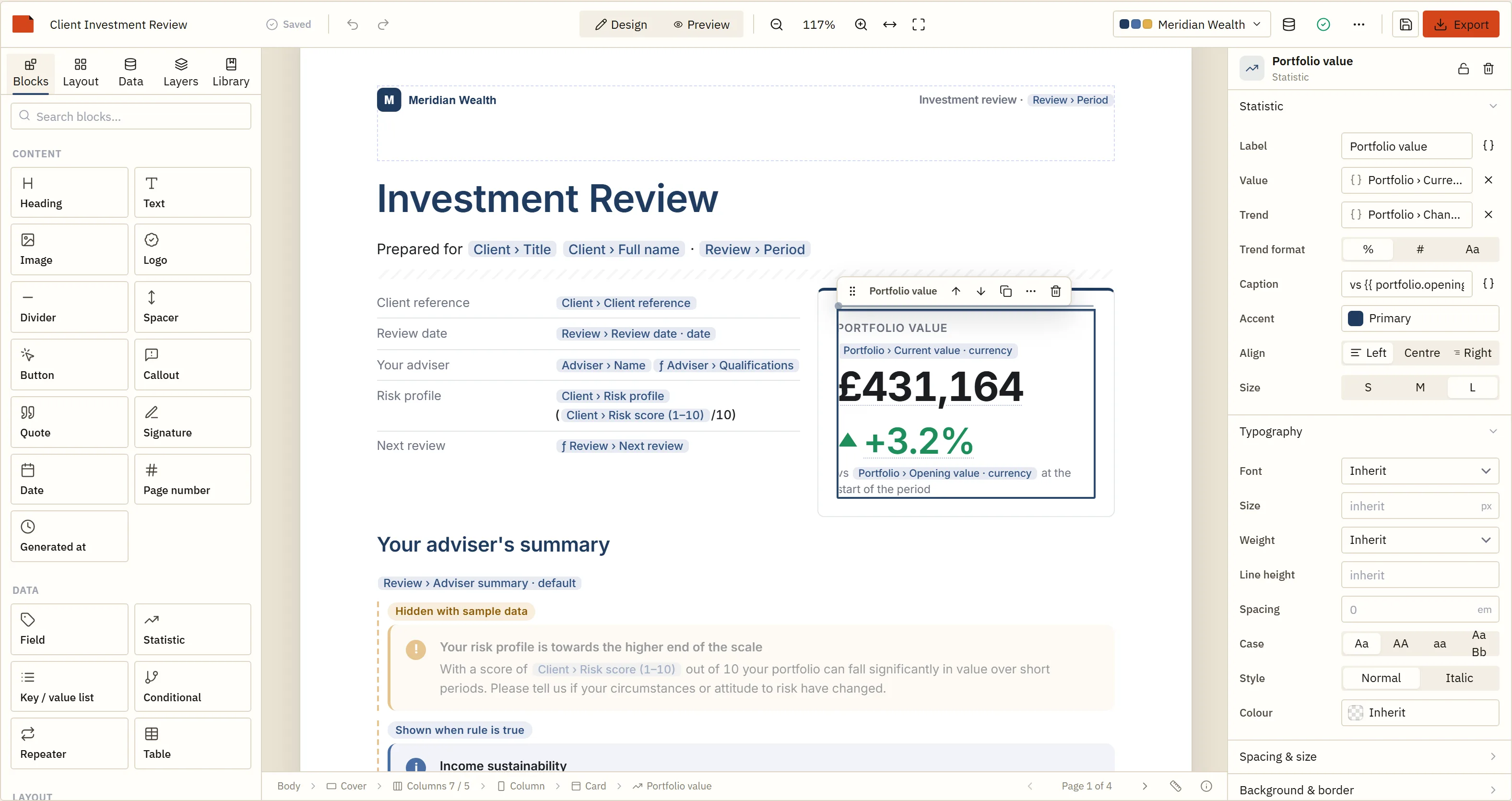
The designer, running here. Nothing is uploaded and no account is needed — it is the same build your users would get.

With react-pdf or jsPDF, you design the report in code.
With BroadPaper, your users design it, and you decide what they may bind to.

That is the whole difference, and it is an architectural one rather than a feature list. Everything below is what it takes to hold up that second sentence in a product you have to support: a typed data contract, a template you can store and validate, pagination nobody has to write, and a PDF that matches what the user approved on screen.

§ 01What you write

Three files, and one of them is your brand.

There is no project template to scaffold and no configuration file. You describe your data, you mount a component, and later — anywhere, in any process — you turn a saved design plus real data into a document.

  1. 01

    Declare what exists

    A DataSource is your half of the contract: the fields, their types and what to call them on screen. The designer knows nothing else about your domain — no table names, no endpoints, no records. Users pick from what you declared, and what they save references those fields by path.

    data-sources.ts React
    import type { DataSource } from "@broadpaper/core";
    
    export const dataSources: DataSource[] = [
      {
        id: "inspection",
        label: "Inspection",
        schema: {
          reference: { type: "string", label: "Reference" },
          carriedOut: { type: "date", label: "Carried out" },
          passed: { type: "boolean", label: "Passed" },
          sitePhoto: { type: "image", label: "Site photograph" },
          findings: {
            type: "array",
            label: "Findings",
            itemSchema: {
              type: "object",
              fields: {
                item: { type: "string", label: "Item" },
                severity: { type: "string", label: "Severity" },
                cost: { type: "currency", label: "Estimated cost", currency: "GBP" }
              }
            }
          }
        }
      }
    ];

    Declaring currency rather than number is what lets the picker offer “£12,345.67” as a one-click format and makes a column of totals format correctly with nobody writing a pipe. An array of objects also exposes each field as a list, which is what a table binds to and what sum() takes.

  2. 02

    Mount the designer

    ReportDesignerProps mirrors the framework-neutral ReportDesignerOptions, so everything in the API reference is a prop. onChange fires on every edit; onSave is yours and is what the Save button and ⌘S call.

    TemplateEditor.tsx React
    import { useState } from "react";
    import { ReportDesigner } from "@broadpaper/react";
    import type { ReportTemplate } from "@broadpaper/core";
    import { dataSources } from "./data-sources";
    import { sampleData } from "./sample-data";
    import { brand } from "./themes";
    
    export function TemplateEditor({ initial }: { initial?: ReportTemplate }) {
      const [draft, setDraft] = useState<ReportTemplate | undefined>(initial);
    
      return (
        // The designer fills its container, so the container needs a height.
        <div style={{ height: "100vh" }}>
          <ReportDesigner
            template={draft}
            dataSources={dataSources}
            sampleData={sampleData}
            theme={brand}
            saveDescription="Saved to this workspace."
            onChange={setDraft}
            onSave={async (template) => {
              const res = await fetch(`/api/templates/${template.id}`, {
                method: "PUT",
                headers: { "content-type": "application/json" },
                body: JSON.stringify(template)
              });
              // Throwing is how you get "Save failed" with your own message
              // in the toolbar, instead of a silent no-op.
              if (!res.ok) throw new Error(`Could not save (${res.status})`);
            }}
          />
        </div>
      );
    }
  3. 03

    Render the document

    One call takes the saved JSON and real data to a vector PDF. It is the same function in a browser, in a Node worker and in a container, and it returns the page count with the bytes.

    render.ts Browser or Node
    import { renderPdfPaginated } from "@broadpaper/forme";
    import { createRegistry } from "@broadpaper/blocks";
    import type { ReportData, ReportTemplate } from "@broadpaper/core";
    import { dataSources } from "./data-sources";
    import { brand } from "./themes";
    
    export async function renderInspection(template: ReportTemplate, data: ReportData) {
      const { pdf, pages, warnings } = await renderPdfPaginated({
        template,                   // the JSON your user designed
        data,                       // this inspection, from your database
        theme: brand,               // the tenant's brand
        dataSources,
        registry: createRegistry(), // plus your own blocks: createRegistry([myBlock])
        metadata: { title: "Site inspection", author: brand.name }
      });
      if (warnings.length) console.warn("[broadpaper]", warnings);
      return { pdf, pages };        // pdf is a Uint8Array
    }
§ 02What you get back

A template is JSON you own, not a file we keep.

onSave hands you a ReportTemplate: a stable, deterministic document, typically 20–60 KB for a multi-page report, that JSON.stringify round-trips losslessly. Put it in a column. That is the whole persistence story.

Because it is data rather than code, the things you would want to do to it are ordinary: one row per tenant, a history table for versions, a diff between two revisions, a copy to a sandbox. Nothing about it depends on a browser, so the report a user designed on Monday is a nightly batch on Tuesday.

Storing and versioning templates →

Templates arriving from a browser are untrusted input like any other. migrateTemplate brings an older save forward, and validateTemplate answers — without any data at all — whether every binding still matches the schema you declared. Run both before you store one, and a design written against last quarter's fields is a 422 rather than a blank on somebody's invoice.

templates.ts Your API
// On the way in, before you store anything a browser sent you.
import { validateTemplate, migrateTemplate } from "@broadpaper/core";
import { createRegistry } from "@broadpaper/blocks";
import { dataSources } from "./data-sources";

export function acceptTemplate(body: unknown) {
  const { template } = migrateTemplate(body);       // older saves are brought forward
  const result = validateTemplate({ template, registry: createRegistry(), dataSources });
  if (!result.ok) throw new HttpError(422, result.errors);
  return template;
}
§ 03Binding

Your schema is the palette.

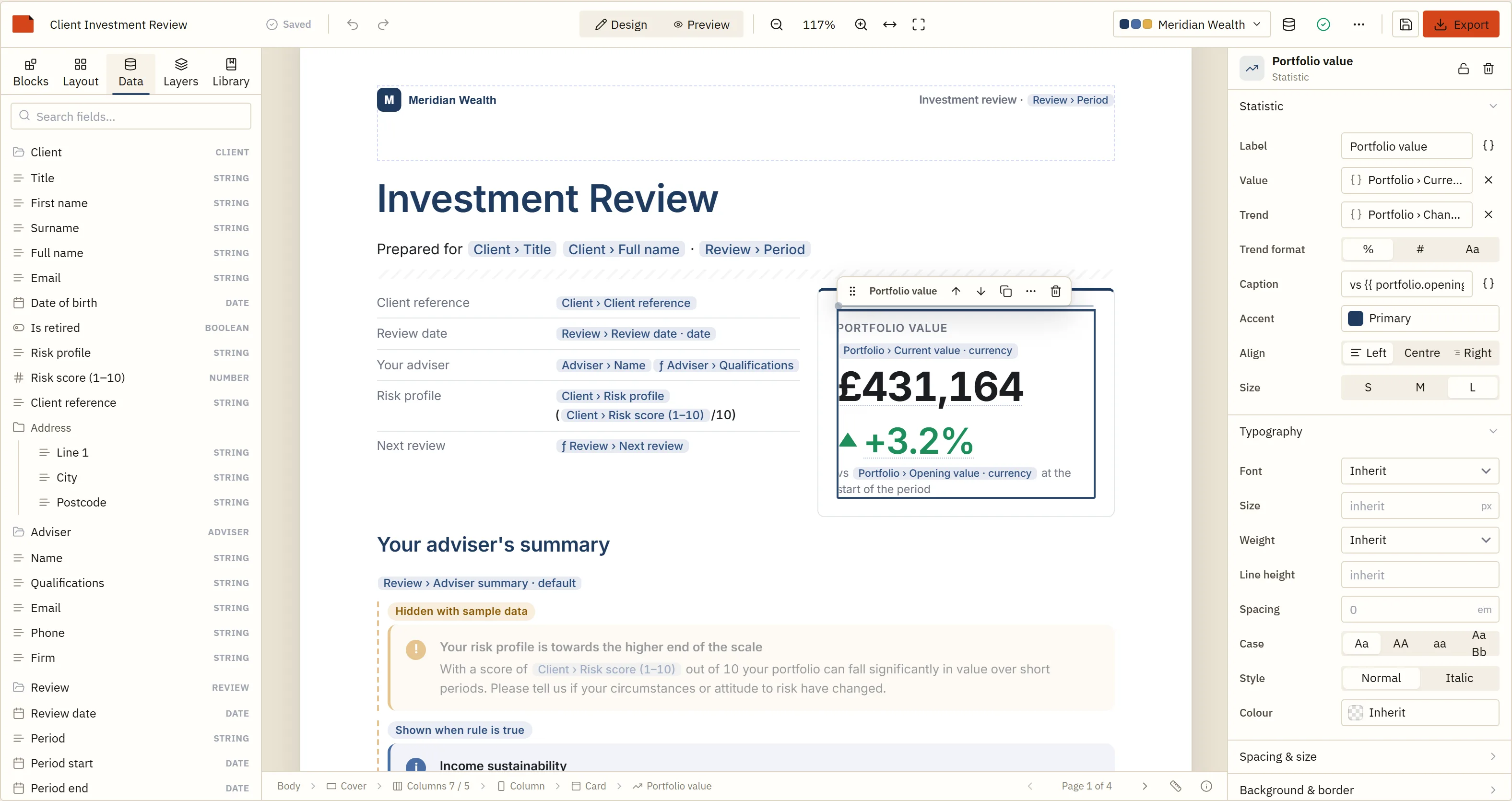
The fields you declared appear as a tree. Drag a scalar onto the page and it becomes a field; drag a list and it becomes a table. Type two braces in any text block and the autocomplete offers your fields, with types checked as the user types — client.firstName | currency is an error on screen, not a surprise in the file.

Expressions are a hand-written tokeniser, Pratt parser and tree-walking interpreter. There is no eval, no Function, and no compilation to JavaScript anywhere in the product — which is the only version of “users can write formulas” that survives a security review.

Bindings and expressions →

The designer's data panel, showing the host application's declared schemas as an expandable tree of typed fields ready to drag onto the page
Fig. 1The Data panel is the host's schemas and nothing else: every chip on the page came from here.
§ 04Output

Where the same template becomes a file.

The page breaks are decided by BroadPaper's own paginator before any backend draws anything, so the answer to “where do we render?” is a deployment question rather than a fidelity one.

In the browser @broadpaper/forme is a Rust engine compiled to WebAssembly — about 7 MB, no Chromium. The tab that designed the report produces the file, and the data never leaves it.
In Node The same package and the same call. This is where scheduled runs and batches live. Rendering is synchronous WebAssembly, so a long document belongs on a worker thread rather than the thread answering requests.
As a service @broadpaper/server puts either backend behind POST /render and /render/batch, with a bounded queue, a bearer token and a Dockerfile. The render service.
From .NET BroadPaper.Client targets .NET 8 and .NET 10 and calls that service, so a C# back end produces the same documents with no JavaScript runtime on the box. The .NET client.
Or no file at all <ReportViewer /> renders the same template as a read-only, page-shaped web page with charts a reader can point at — the half of the product a PDF cannot do.
§ 05React specifics

Six things worth knowing before you wire it up.

The template prop is a “load this” signal

It is the initial document plus a way to open a different one. Passing an object the editor did not last emit reloads it; passing back what you received from onChange does nothing. That is what makes the controlled-looking pattern above safe, and it means “open template” needs no remount and no key trick.

The ref is the whole imperative API

getTemplate(), setTemplate(), setTheme(), setMode(), undo(), redo(), validate(), exportPdf(), print(), getLayout(), registerBlock() — available from the first render after mount, which is what lets you build a toolbar of your own instead of using ours.

Give the wrapper a height

The editor fills its container. It is a three-column grid — palette, canvas, inspector — and below about 820 px it becomes a different layout, with the side panels as drawers over the canvas. It measures its own root element to decide, not the window, because an embedded designer in a narrow pane of a wide page is the same problem as a phone.

Feature flags narrow it for non-developers

features turns parts of the designer off: expressions: false hides free-form expression editing, pageSettings, jsonView and styleOverrides come off for an audience who should not meet them, and whiteLabel: true removes the BroadPaper mark from the toolbar. A computed value stays readable when expressions are hidden — it is named after the fields it reads rather than shown as source.

React 18 and 19, as a peer

The package uses the React your application already has. Note one React 19 consequence if you extend the editor: ref became an ordinary prop, so anything merging refs has to merge rather than overwrite.

Next.js: client component, and a webpack flag

The designer mounts into a DOM element, so it belongs behind dynamic(() => import("./Editor"), { ssr: false }). If you also render PDFs in the browser, webpack needs experiments.asyncWebAssembly and the @broadpaper/forme import has to stay out of anything that renders on the server.
Is this for you?

A good fit

  • A multi-tenant product where customers want their own layout, their own branding, or both
  • Financial, compliance, inspection or practice-management software that sends documents to somebody's client
  • You are already maintaining more than a handful of report templates by hand
  • Layout change requests are reaching your backlog with a customer's name on them
  • The document has to survive page breaks: running totals, repeated table headers, “page 3 of 7”

Probably overkill

  • One invoice layout that has not changed in two years
  • A receipt, a label or a one-page form drawn at fixed coordinates
  • A document whose layout only ever changes when the schema does — in which case code is the honest place for it
  • Print stylesheets already produce what you need, and nobody outside engineering has ever asked to change one

If the third and fourth are false, a code-first library is smaller, free and the better engineering decision. We would rather say that here than three weeks into an evaluation.

Questions developers actually ask

How do I let users design PDF reports in React?
Declare the fields they may use as DataSource[], mount <ReportDesigner dataSources={…} /> from @broadpaper/react, and persist the ReportTemplate it hands back from onSave. To produce a document, pass that template plus real data to renderPdfPaginated — in the browser, in Node, or behind your own service. The designer never sees your database; it only ever knows the fields you declared.
What is the difference between react-pdf and a report designer?
With react-pdf you write the document as React components, so your developers own every layout. With BroadPaper you declare the data and your users own the layout, and the saved design is JSON rather than code. If your templates rarely change and nobody outside engineering needs to touch them, react-pdf is the smaller, cheaper answer — the comparison says so in more detail.
Can each customer have a different report template?
Yes — that is the usual reason people arrive here. A template is a JSON document you store, so one row per tenant per report is all the modelling it needs. Branding is separate again: a template that refers to theme tokens rather than fixed colours re-brands with one theme option, so a hundred customers can share one design and still get their own.
Do I need a server to generate the PDF?
No. @broadpaper/forme is a WebAssembly engine that runs in the tab, so the browser that designed the report can also produce the file. The same package runs in Node when you want documents generated on a schedule, and @broadpaper/server puts either backend behind HTTP with a queue and a bearer token when you would rather it were a service.
Does it work with Next.js?
The designer mounts into a DOM element, so it belongs in a client component — dynamic(() => import("./Editor"), { ssr: false }) is the usual shape. If you render PDFs in the browser too, webpack needs experiments.asyncWebAssembly and the @broadpaper/forme import has to stay out of anything that renders on the server. Both are covered in Browserless PDF.
Which React versions are supported?
React 18 and 19, as a peer dependency — the package uses the React your application already has rather than bringing its own. The editor is React internally; the Angular package wraps the same mount API, which is why one product can serve both.
Is BroadPaper a reporting server?
No. There is no BroadPaper service your data passes through, no telemetry and no licence check that phones home. The SDK is packages you install; the optional render service is a container you run. Licences are signed certificates verified offline.

Fifteen minutes to a designer in your own app.

The demo is the whole editor with no account and nothing uploaded. The quick start is the same thing in a Vite React app, in files you can copy in order.