Angular 21+ · Standalone components

Angular report designer

Three standalone components — a designer, a preview and a read-only viewer — that mount the same editor the React package does and run outside Angular's zone. You declare the data; your users design the document; BroadPaper produces the PDF in the browser, in Node, or from your .NET back end.

pnpm add @broadpaper/core @broadpaper/blocks @broadpaper/renderer @broadpaper/editor @broadpaper/angular @broadpaper/forme

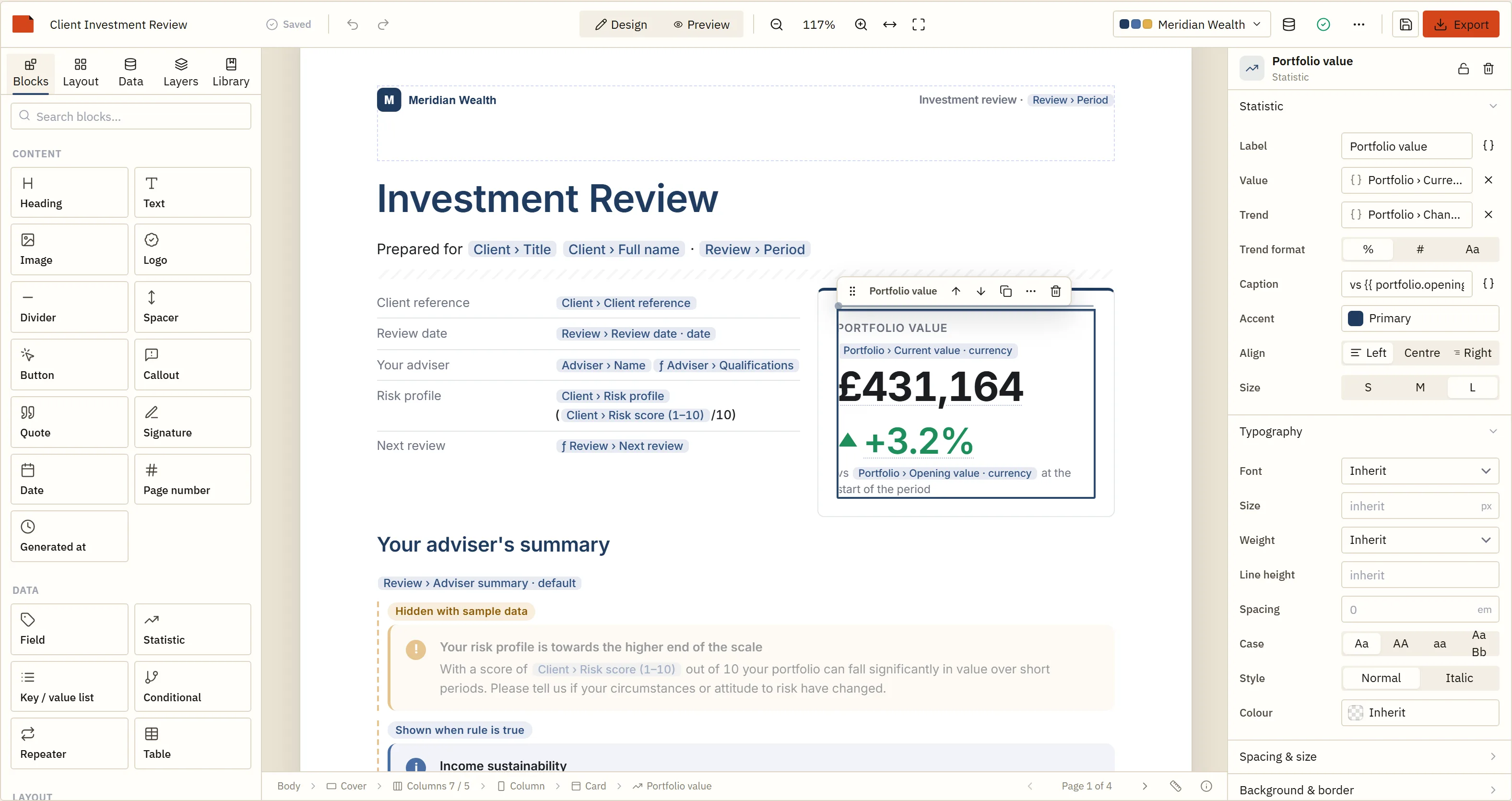
The designer itself. It is framework-neutral inside — the Angular package is a component wrapper over this exact editor.

Code-first PDF libraries make developers the layout department.
A report designer makes it somebody else's job, safely.

BroadPaper is an embeddable visual report designer for web applications. Your Angular app declares which fields exist; your users lay out the document against them; the SDK owns measurement, pagination, branding and the PDF. What comes back is JSON, so everything you already know how to do with a row applies to a layout.

§ 01The component

A standalone component, bindings and outputs. Nothing unusual.

Inputs mirror ReportDesignerOptions; outputs are templateChange, selectionChange, validate, modeChange, themeChange and ready. The host element is display: block with a minimum height, so it behaves like any other component you have to give room to.

template-editor.component.ts Angular
import { Component } from "@angular/core";
import { ReportDesignerComponent } from "@broadpaper/angular";
import type { DataSource, Issue, ReportTemplate, Theme } from "@broadpaper/core";

@Component({
  selector: "app-template-editor",
  standalone: true,
  imports: [ReportDesignerComponent],
  template: `
    <bp-report-designer
      [template]="template"
      [dataSources]="dataSources"
      [sampleData]="sampleData"
      [theme]="theme"
      [themes]="themes"
      [onSave]="save"
      (templateChange)="draft = $event"
      (validate)="issues = $event"
      style="height: 100vh"
    />
  `
})
export class TemplateEditorComponent {
  /** The saved design, or undefined for a new one. */
  template?: ReportTemplate;
  /** The current, unsaved design. */
  draft?: ReportTemplate;
  issues: Issue[] = [];

  theme!: Theme;
  themes: Theme[] = [];

  dataSources: DataSource[] = [
    {
      id: "policy",
      label: "Policy",
      schema: {
        reference: { type: "string", label: "Policy number" },
        renewsOn: { type: "date", label: "Renews on" },
        premium: { type: "currency", label: "Annual premium", currency: "GBP" },
        sections: {
          type: "array",
          label: "Cover",
          itemSchema: {
            type: "object",
            fields: {
              name: { type: "string", label: "Section" },
              limit: { type: "currency", label: "Limit", currency: "GBP" },
              excess: { type: "currency", label: "Excess", currency: "GBP" }
            }
          }
        }
      }
    }
  ];

  sampleData = [
    {
      id: "typical",
      label: "A renewing policy",
      data: {
        policy: {
          reference: "HX-4417",
          renewsOn: "2026-11-01",
          premium: 1840,
          sections: [
            { name: "Buildings", limit: 750000, excess: 500 },
            { name: "Contents", limit: 60000, excess: 250 }
          ]
        }
      }
    }
  ];

  // An arrow property, not a method. The component hands this straight to the
  // editor, so it must not depend on how it is called — a method here loses
  // `this` and fails the first time somebody presses Save.
  save = async (t: ReportTemplate): Promise<void> => {
    const res = await fetch(`/api/templates/${t.id}`, {
      method: "PUT",
      headers: { "content-type": "application/json" },
      body: JSON.stringify(t)
    });
    if (!res.ok) throw new Error(`Could not save (${res.status})`);
  };
}

[onSave] is an arrow property, not a method

The component passes the reference straight through to the editor, so it must not depend on how it is called. Written as a class method it loses this and fails the first time anybody presses Save — in production, on somebody else's document.

Throwing in save is the error path

The toolbar shows “Save failed” with your message. saveDescription is the other half: one sentence saying where saving actually goes, because only the host knows, and saying nothing invites the user to assume the safest possible answer.
§ 02Change detection

Outside the zone, on purpose.

A report canvas is a drag surface. Dragging a block fires pointer events at frame rate, and a viewer scrolling a forty-page document fires a page-position event per frame. Running your application's change detection on each of those would make your performance our fault.

So all three components create their editor inside NgZone.runOutsideAngular, and step back in with zone.run only to emit an output. Everything you subscribe to arrives in the zone; nothing you did not ask for does.

zone.js and zoneless applications are both fine. The SDK has no opinion about your change detection and does nothing that would force one — which was not always true of embeddable editors and is worth saying plainly.

(ready) emits the framework-neutral imperative API, which is how you drive the editor from a toolbar of your own rather than using the one it ships with.

designer-with-toolbar.component.ts Angular
import { Component } from "@angular/core";
import { ReportDesignerComponent } from "@broadpaper/angular";
import type { ReportDesignerApi } from "@broadpaper/editor";

@Component({
  selector: "app-designer-with-toolbar",
  standalone: true,
  imports: [ReportDesignerComponent],
  template: `
    <button type="button" (click)="api?.setMode('preview')">Preview</button>
    <button type="button" (click)="api?.undo()">Undo</button>
    <button type="button" (click)="api?.exportPdf()">Export</button>
    <bp-report-designer (ready)="api = $event" style="height: 90vh" />
  `
})
export class DesignerWithToolbarComponent {
  api?: ReportDesignerApi;
}
§ 03Three components

Design it, check it, or publish it as a page.

<bp-report-designer> The editor: palette, canvas, inspector, validation, undo. Give it a height. Everything about what a user may reach is an input — [features], [dataSources], [themes].
<bp-report-preview> Read-only, paginated, through the same pipeline the PDF uses. [template] is required and the (layout) output fires after each pagination, which is where a page count comes from.
<bp-report-viewer> The report as a page a reader can read: page-shaped, zoomable, with charts they can point at. (pageChange) tracks the scroll position; the host element needs a height or it collapses to its toolbar.
angularInspector() Hands one of a custom block's inspector fields to an Angular component of yours. It takes the component and a ViewContainerRef, and your component receives the field's API on an api input.
§ 04Branding

One design, every customer's brand.

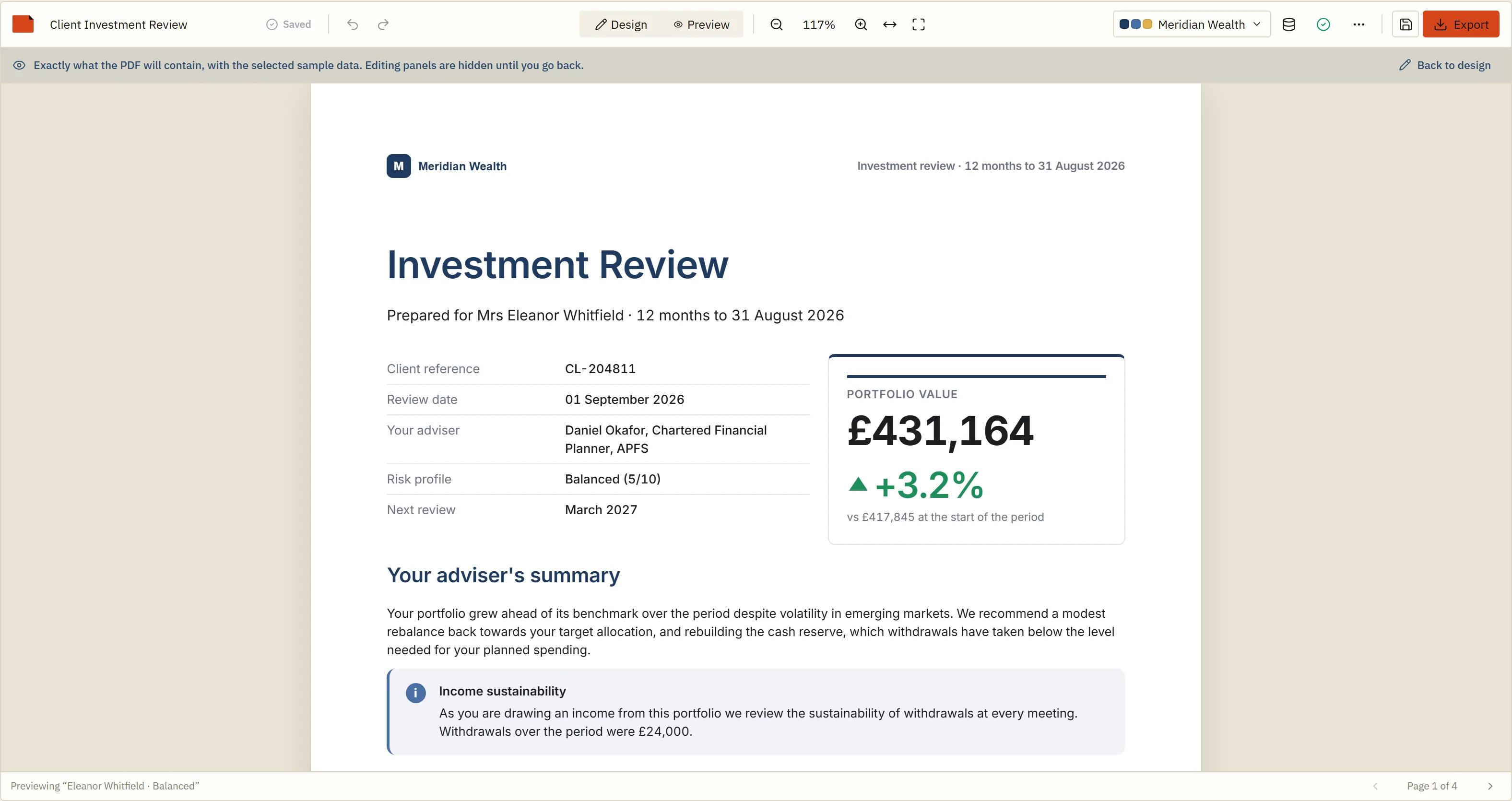
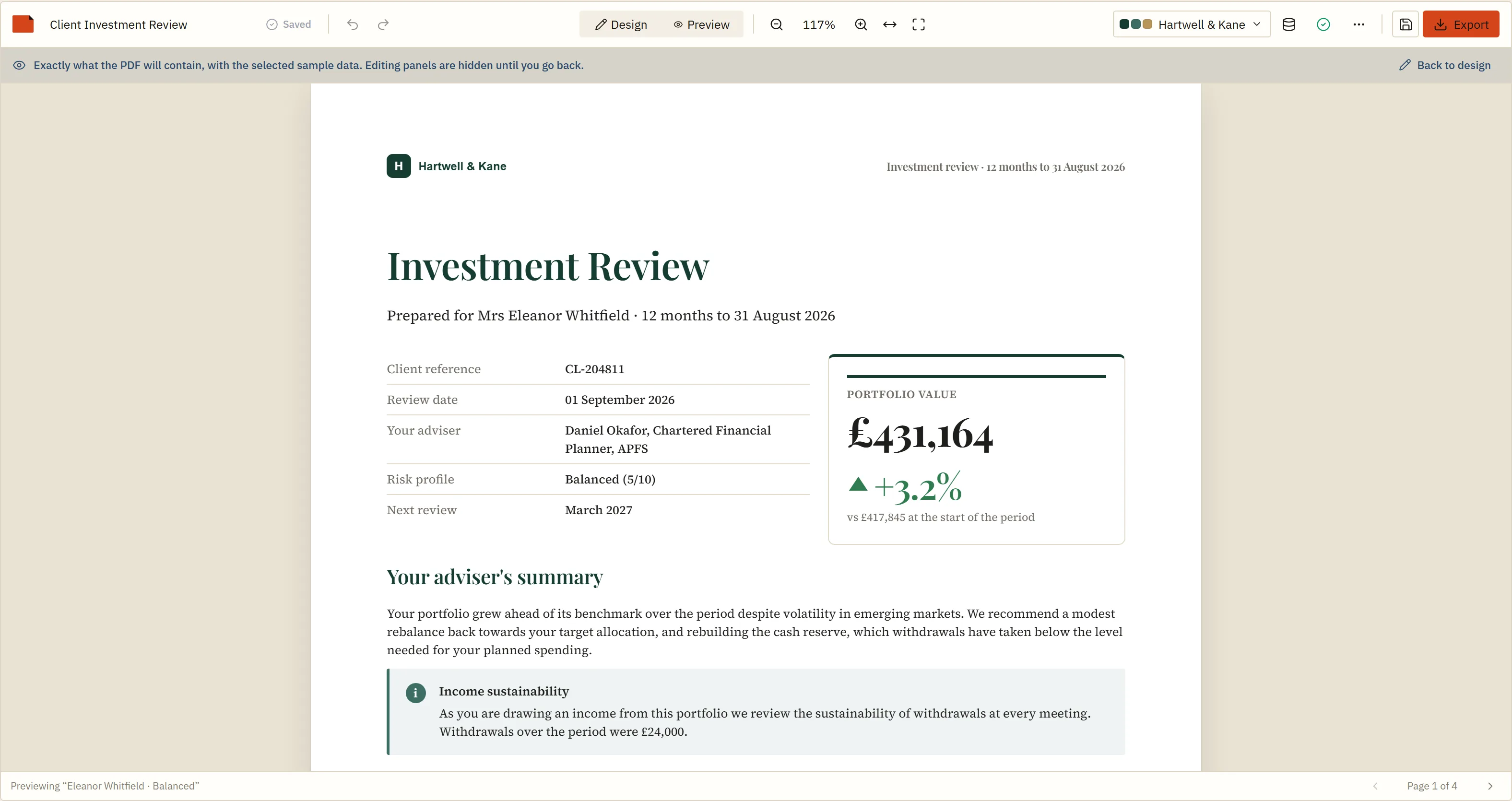
A template can name theme tokens instead of fixed colours and fonts. Built that way, the same saved JSON renders as one customer or another with a single [theme] binding — which is how a white-label product serves everybody from one design rather than a fork per account.

Preview of a client report rendered in the Meridian Wealth brand: navy headings, gold accents and that firm's logo
Fig. 1aOne template.
The same client report rendered in the Hartwell and Kane brand: brown headings, different typeface and a different logo, identical structure
Fig. 1bSame template, same data, one theme changed.

Fonts are declared once in theme.fonts, and the same TrueType bytes both measure the layout and draw the file — which is what makes the page break a user approves on screen the page break in the PDF.

§ 05Build and deployment

The Angular-shaped questions.

The engine and the Angular CLI

The PDF engine is Rust compiled to WebAssembly. Angular's builder wants the engine's worker build, and @broadpaper/forme resolves to it for you — there is nothing to add to angular.json. Webpack hosts need experiments.asyncWebAssembly; Angular does not.

Lazy-load the designer

It is the heaviest route in the application, and most of your users will never open it. A loadComponent route keeps the editor and the engine out of the initial bundle for everybody who only ever reads documents.

app.routes.ts Angular
import type { Routes } from "@angular/router";

export const routes: Routes = [
  { path: "reports", loadComponent: () => import("./reports/list.component").then((m) => m.ListComponent) },
  // The designer and its engine are the heaviest thing in the application.
  // Behind a lazy route, the people who never open it never download it.
  {
    path: "reports/:id/design",
    loadComponent: () => import("./reports/template-editor.component").then((m) => m.TemplateEditorComponent)
  }
];

Ivy declarations, not a bundle

@broadpaper/angular is an ng-packagr library published in partial compilation mode, which is what lets your own build link it against the Angular version you are on rather than one we chose.

Narrow embeddings

Below 820 px the designer becomes a different layout — side panels as drawers over the canvas, a wrapped toolbar. It measures its own root element to decide rather than the window, so a designer in a narrow pane of a wide page behaves like a designer on a phone, which is the correct answer for an embedded component.

§ 06When the back end is .NET

Angular in front, C# behind, one template between them.

This is the shape most Angular business applications actually have, and it is why the .NET client exists. Your users design in the browser; your server renders on a schedule, on an endpoint, or into a nightly batch — from the same JSON, with the same paginator, so the page breaks do not move between the two.

@broadpaper/server is the engine behind HTTP with a bounded queue, a bearer token and a Dockerfile. BroadPaper.Client multi-targets .NET 8 and .NET 10 because it goes to NuGet and its consumers pick the runtime. The service speaks plain HTTP and expects TLS to be terminated in front of it, which matters because it authenticates with a shared bearer token.

The .NET client → The sample application →

PolicyDocumentsController.cs .NET
var result = await broadpaper.RenderAsync(new RenderRequest
{
    // The same JSON the Angular designer saved, out of the same table.
    Template = JsonNode.Parse(policy.TemplateJson),
    Data     = RenderRequest.ToNode(policy.Data),
    Now      = policy.AsAt,
    Locale   = "en-GB",
    Currency = "GBP"
}, ct);

return File(result.Pdf, "application/pdf", $"{policy.Reference}.pdf");

The sample application is a public repository with an Angular front end and a React one over a single .NET back end, both mounting the designer and the read-only viewer from the published packages — which is the part a monorepo cannot prove.

Is this for you?

A good fit

  • An Angular line-of-business application whose customers keep asking for layout changes
  • Insurance, financial services, field services, healthcare, compliance — anywhere a document leaves the building with a client's name on it
  • A .NET back end that has to produce the same document on a schedule as the browser produces on demand
  • Several report types, several tenants, and a growing folder of hand-maintained templates
  • Documents long enough that pagination is a real problem rather than an afterthought

Probably overkill

  • Angular's own print view already does the job and nobody has complained
  • Two fixed documents whose layout changes once a year, in a release, by the team who owns the code
  • A dashboard export where a screenshot of the page is genuinely what people want
  • Documents nobody outside the engineering team will ever want to restructure

The honest test is whether layout requests are reaching your backlog. If they are not, none of this pays for itself.

Questions Angular teams ask

How do I add a drag-and-drop report designer to an Angular app?
Install @broadpaper/angular, import the standalone ReportDesignerComponent, and put <bp-report-designer [dataSources]="…" (templateChange)="…" /> in a template. The component mounts the same framework-neutral editor the React package mounts, and gives you the saved design back as JSON. The full walkthrough covers routing, lazy loading and change detection.
Does it need zone.js, or does it force me to go zoneless?
Neither. The designer runs inside NgZone.runOutsideAngular, so canvas interactions never trigger your application's change detection, and it does nothing that would force a change-detection strategy on you. Zone-based and zoneless applications are both supported and both tested.
Which Angular version does it need?
Angular 21 or later. That is the version the package's Ivy declarations are emitted against, and it is the floor because everything below it has reached end of life or is about to — v20's LTS expires in November 2026 and v19's has already gone.
Can the PDF be produced by a .NET back end?
Yes, and this is the common shape for Angular teams. @broadpaper/server puts the engine behind POST /render with a queue and a bearer token; BroadPaper.Client on NuGet targets .NET 8 and .NET 10 and calls it. Your C# service posts the stored template and the row it is rendering, and gets bytes back — no Node runtime and no native PDF library on the box.
Does the WebAssembly engine work with the Angular CLI?
Yes, with nothing to configure. Angular's builder needs the engine's worker build, and @broadpaper/forme resolves to it for you. That is not true of every bundler — webpack needs experiments.asyncWebAssembly — which is why it is worth saying plainly here.
Can customers each have their own report layout?
Yes. A design is a JSON template you store, so per-tenant layouts are rows rather than code. Branding is separate: a template built on theme tokens re-brands with one [theme] binding, so one design can serve every customer and still look like theirs.

See it running before you plan around it.

The demo is the same editor the Angular component mounts — no account, nothing uploaded, and a real vector PDF at the end.